Run every project. Know every margin. See live project profitability →
Platform · Contacts

Your address book doesn't
know your trade discount

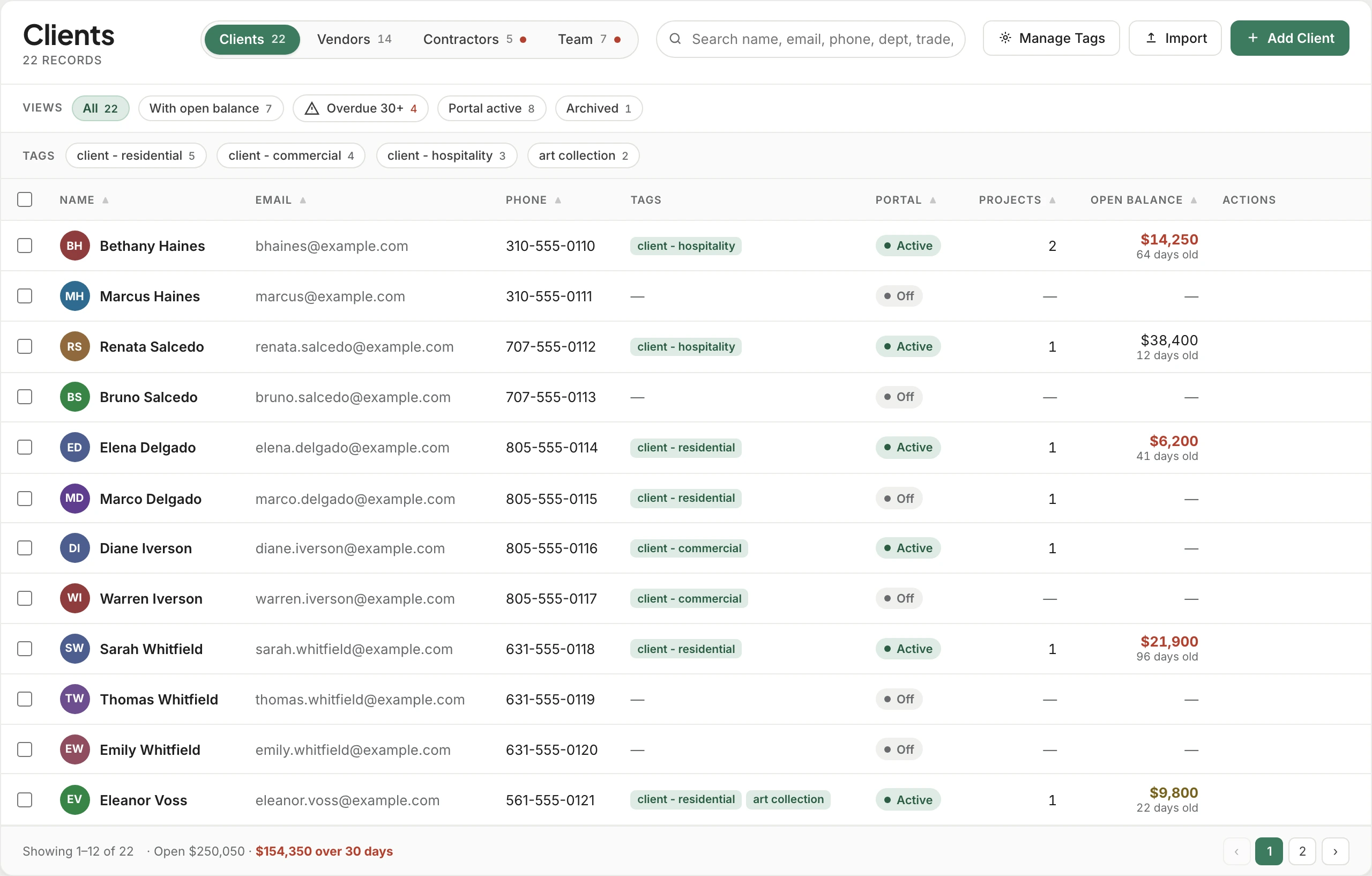
This one does. A client record carries portal access, credits, and the tax rate that applies to them. A vendor record carries reps, trade discount, markup, and every purchase order you've ever sent. Same list, two entirely different animals.

Contacts14 records
+ Add contact
NameEmailTagsClient portalProjects
BHBethany Hainesbethany.haines@gmail.com Active
MFMadison Farnsworthm.farnsworth@gmail.com client · hospitalityOff
PRPriya Ramanpriya.raman@gmail.com Active
BSBradford Shumannb.shumann@gmail.com Off

Trusted by the studios doing the work

2 shapes
one list holding clients and vendors, each with the fields its own kind needs
5
pricing defaults on every vendor — discount, markup, margin, landed, tax
4 digits
plus their email — all a client needs to reach their portal
0
searches through email to remember what a vendor's discount was
Two records

A client and a vendor need different things from you

One gets a portal login and a credit balance. The other gets a trade discount, a rep on speed dial, and a login to their own trade site. Storing both as "a contact with a phone number" is why the discount ends up in someone's inbox.

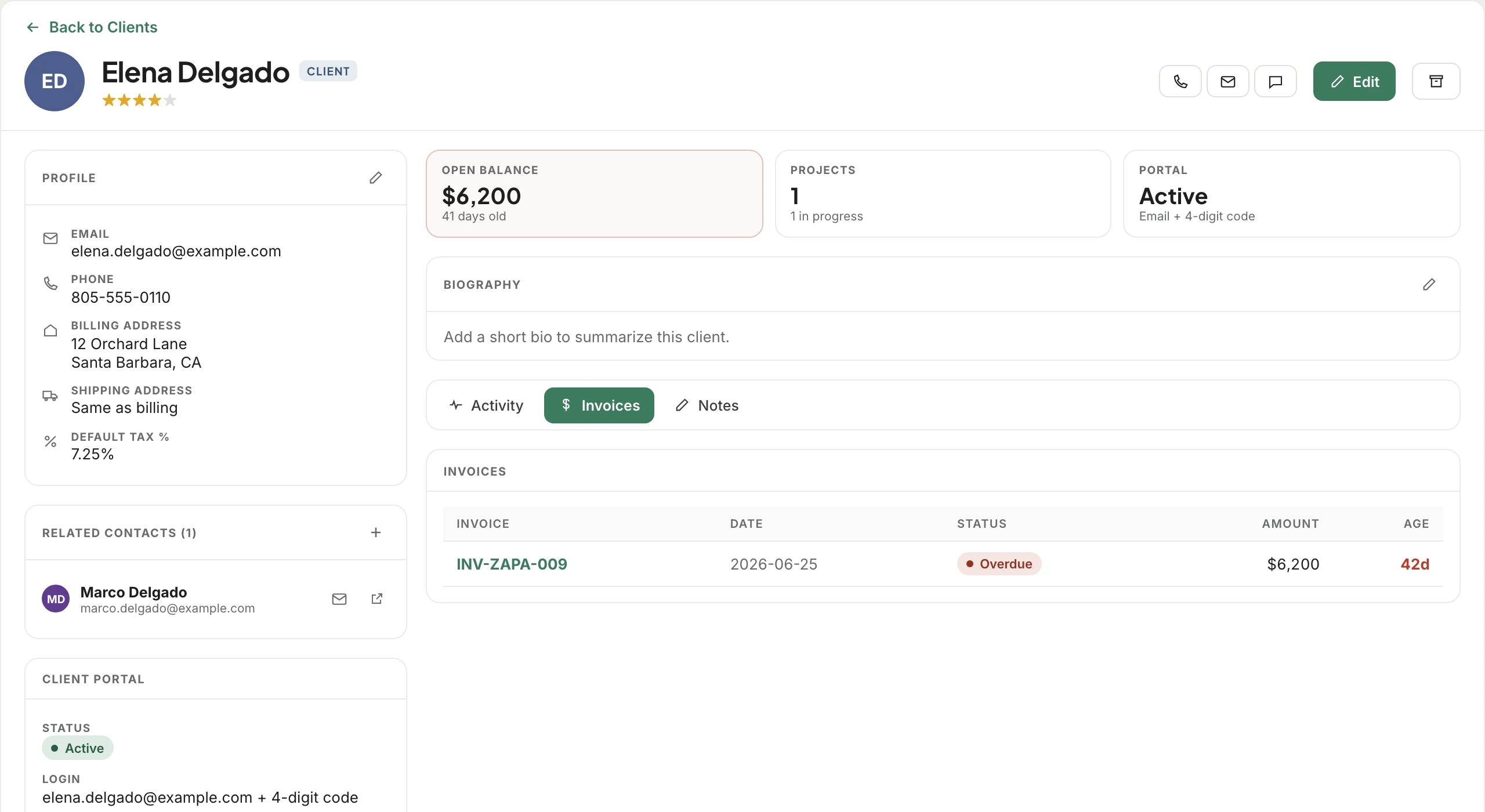
Billing & shipping addressKept separately — the sofa rarely ships to the billing address
Default tax %Rides onto their estimates and invoices automatically
Client portal accessEmailed access, plus a four-digit code they use with their email
Credits on accountA running balance with every credit, refund, and application
ProjectsEvery job they're attached to, from one place
Signed contractsThe agreement itself, with the date it was signed
Tags & bio"Client · hospitality", and the note about how they like to be emailed
Trade discountThe percentage you actually get, stored where it's used
Default markup & marginApplied to their products without anyone remembering to
Landed multiplierFor the vendors whose freight always lands the same way
Multiple repsName, email, phone — with one marked default
Trade site loginURL, username, and password for the portal you order through
Account numberTheirs for you, so it's on the purchase order already
Purchase order historyEvery PO, its client, status, and balance
Payout methodSend a signup link and they choose how they want to be paid

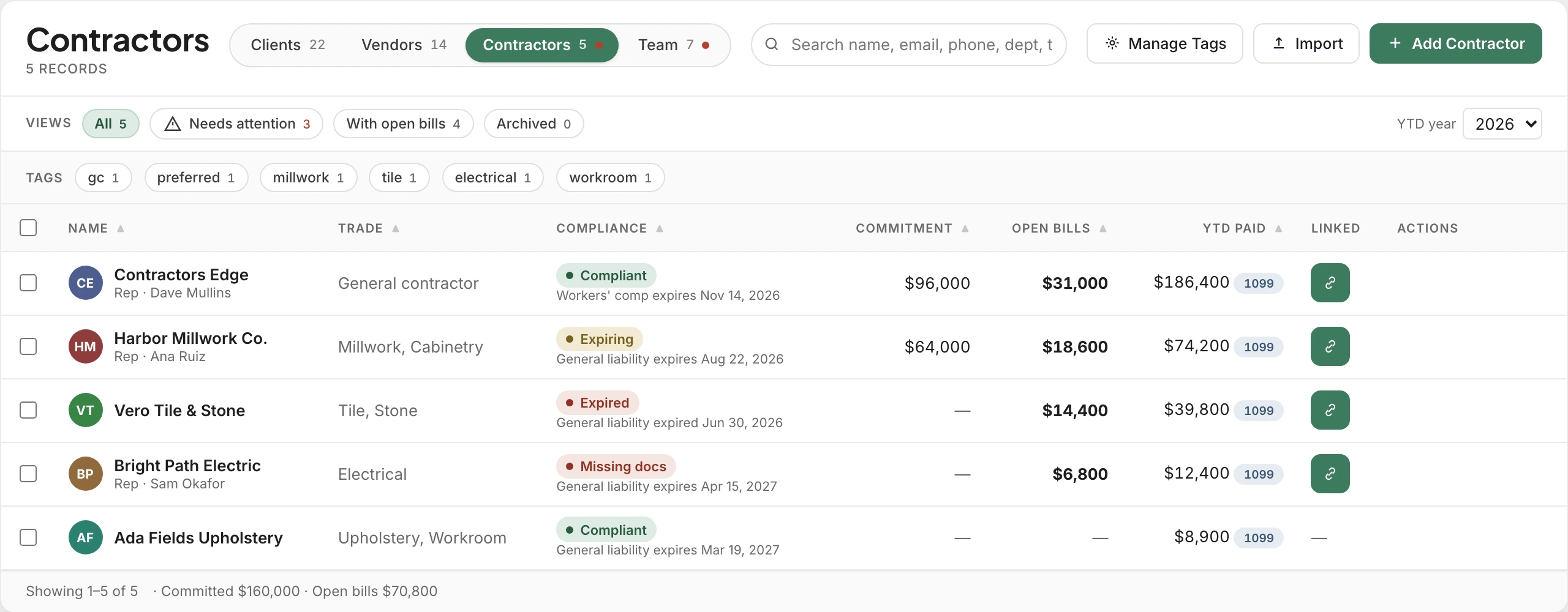
A vendor can also be marked as a contractor, which moves them into a project's extra costs rather than its product orders — or hidden from purchase orders entirely if you never raise one for them.

Client record

Where "did we credit them for that?" gets answered

Client credits are the thing most studios track in their head until the day it matters. Here they're a ledger — issued, applied, refunded, with what's left.

A designer and her client at the client's dining table, going through the account together.
Credit on account$1,000.00Currently available
Credits applied$15,100.00Lifetime
DateTypeAmountApplied toRemaining
Jul 7, 2026Applied to invoice−$12,600.00INV-0068$0.00
May 14, 2026Refund$5,600.00$0.00
May 14, 2026Applied to invoice−$2,500.00INV-0061$0.00
May 12, 2026Credit$1,000.00$1,000.00
Vendor record

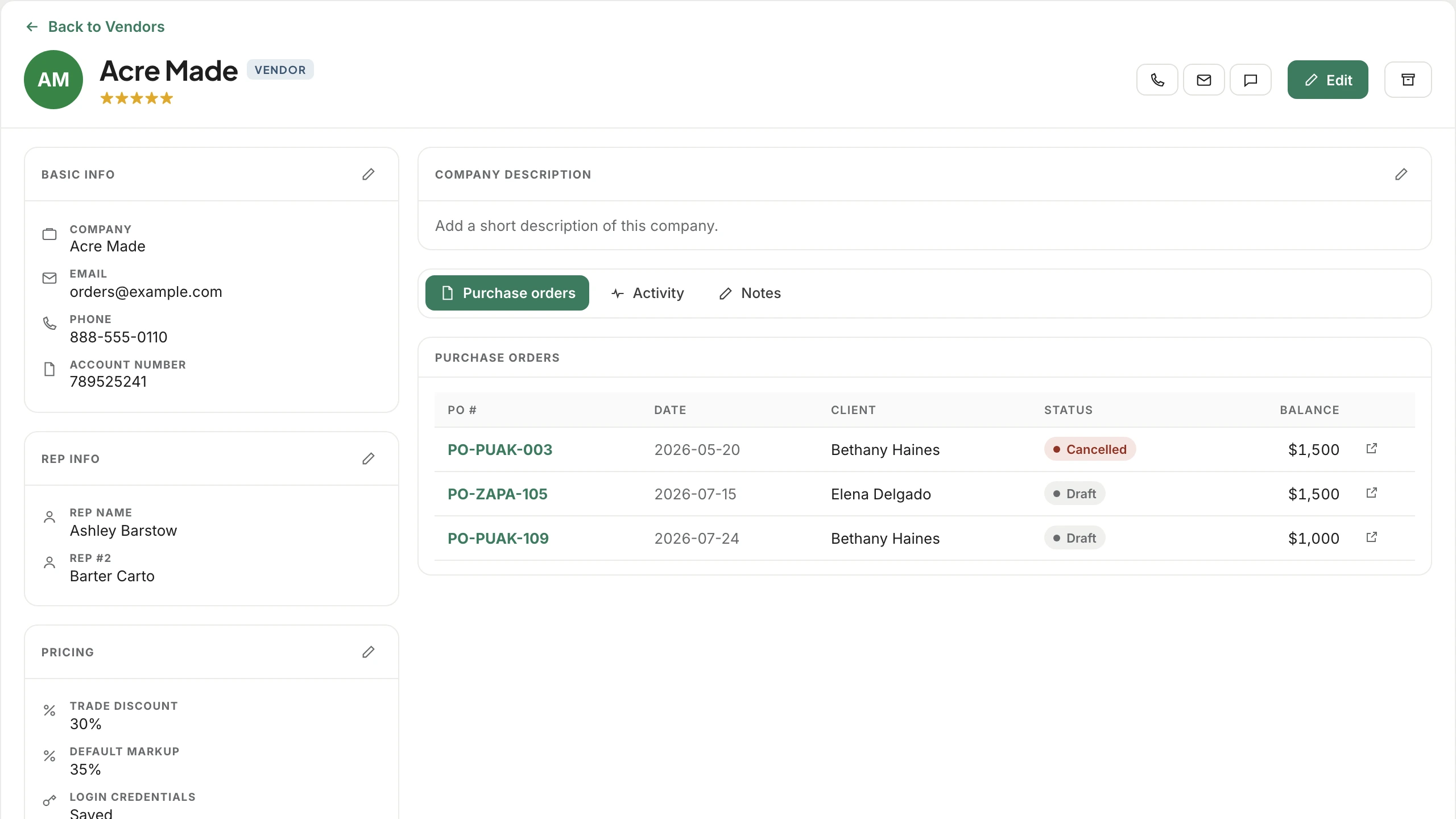
The trade discount lives where you'd look for it

Not in a spreadsheet tab called "vendor terms FINAL v3". On the vendor, next to the reps who answer the phone and the orders you've already placed with them.

Pricing
Trade discount30%
Default markup35%
Account number789525241
Reps
Ashley Barstow defaultashley@rep.com · 909-558-4837
Barter Cartobarter@rep.com · 909-558-4838
ActivityNotesPurchase orders
PO #DateClientStatusBalance
PO-0109Jul 24, 2026Bethany HainesDraft$1,000.00
PO-0105Jul 15, 2026Priya RamanDraft$1,500.00
PO-0003May 20, 2026Bethany HainesCancelled$1,500.00
Client portal

Access without another password to forget

Tick a box and the client is emailed access. They sign in with their email address and a four-digit code — no account to create, no password reset at nine on a Sunday.

Client portal code
4821

The client logs into the portal with their email plus this four-digit code.

  • Turn it off for a client who'd rather you just call them
  • Portal state is visible on the list, so you can see who has access at a glance
  • Notifications can be silenced per contact without revoking access
  • The same record drives what they see in the portal — projects, approvals, invoices
The connected record

Everything else reads from here

Estimates know the tax rate

The client's default tax percentage lands on the estimate without anyone typing it, which is one fewer number to get wrong on a document the client signs.

POs carry the account number

The vendor's account number, rep, and terms are already on the purchase order — because they live on the vendor rather than in whoever raised the last one.

Products inherit the pricing

Clip something from a vendor you've set up and their discount, markup, and landed multiplier are already applied. No mental arithmetic at the point of sourcing.

Bills build a spend history

Every bill and payment for a trade collects on their record, so "what have we spent with them this year" is a question with an answer.

Customers and vendors sync

Both directions with QuickBooks, so a vendor your bookkeeper adds over there turns up over here rather than being typed twice.

Contracts stay attached

The signed agreement sits on the client with the date it was signed — not in a folder named after the month you happened to send it.

Questions we hear

Contacts, specifically answered

Can one company be both a client and a vendor?

They're separate record types because they hold different fields — a client has portal access and credits, a vendor has trade terms and reps. A firm that is genuinely both gets a record of each kind.

How does a client actually get into the portal?

Tick "send client portal access" and they're emailed. They sign in with their email address and a four-digit code, so there's no separate account to create or password to lose.

Can I store more than one rep for a vendor?

Yes, as many as you deal with, each with their own name, email and phone — and one marked default so purchase orders know who to address.

What's the landed multiplier for?

Vendors whose freight and duty reliably land at a similar proportion of cost. Setting it once means product from them carries a realistic landed cost without a per-item calculation.

Do vendor discounts apply to list price or cost?

Either. There's a per-vendor setting for whether the discount derives from a list price you enter, or follows your studio default. Products already created aren't retroactively changed.

Can I hide a vendor we never raise POs for?

Yes — mark them as not creating purchase orders and they drop out of the PO flow while staying available everywhere else.

Can I bring in the contacts I already have?

There's an import for both contacts and vendors, and tags can be managed in bulk once they're in.

See the connected workflow

Run the project. See the real margin.

We'll show you a vendor set up once, and the discount, rep, and account number turning up everywhere they should afterwards.